Affiliate links on Android Authority may earn us a commission. Learn more.
I thought I’d hate Gmail’s new AI Inbox, but it’s surprisingly great


To date, I’ve mostly ignored the Gemini features in Google Workspace. I’ll occasionally consult Gemini when I need to extract a specific piece of information from a lengthy PDF, or ask it to format a spreadsheet or Google Docs template. The popular AI features, like Help me write and the Gemini sidebar, weren’t enticing.
However, I recently gained access to AI Inbox in Gmail, and it’s the first AI tool in Workspace that does more than take up space.
If you’re the kind of person who keeps their inbox empty and completes every action item immediately, I’ll say right off the bat that AI Inbox might not be for you. I wish I were that person, but instead, I’m the one with inboxes full of over 100,000 emails. Before subscribing to Google AI Pro, I’d declutter just enough to get under the free storage limit — but never more. It’s only fitting that AI Pro also gave me access to AI Inbox, the feature that’s giving me more control over my incoming messages.
Do you want AI in your email inbox?
AI Inbox cuts out the noise with curated updates

For those keeping track at home, Google rolled out AI Inbox to trusted testers way back in January, and the feature is currently in beta. However, it started as an exclusive for Google AI Ultra subscribers. That plan cost $250/month at the time, so it wasn’t for casual users like me. Last month, Google expanded AI Inbox to users of the AI Plus and AI Pro subscription plans, opening it up to millions more.
I first noticed AI Inbox hit my Gmail when a third button appeared in the app’s bottom navigation bar. Usually, you have the inbox and Google Meet buttons there, but AI Inbox adds a new one in the middle. It broke my muscle memory at first, which led me to give AI Inbox a shot. Early on, what made the feature useful wasn’t something it added — it was everything it removed.
Emails are frustrating in 2026. You can’t buy a product online without being added to a marketing campaign, and your inbox fills up with promotional slop. Throw in spam and phishing attempts, and I end up missing the emails that are actually important in between the nonsense. One of AI Inbox’s best qualities is that it completely ignores these kinds of messages by default.
Specifically, AI Inbox only highlights emails in Gmail’s Primary tab. If an email is sorted into the Promotions or Social tabs, it won’t appear in the AI Inbox. Better yet, AI Inbox filters out spam and anything you previously chose to archive, delete, mute, or snooze. The end result is an AI Inbox that only includes the most important emails, which is what the Primary tab should’ve been in the first place.
AI Inbox finds action items and topics in emails

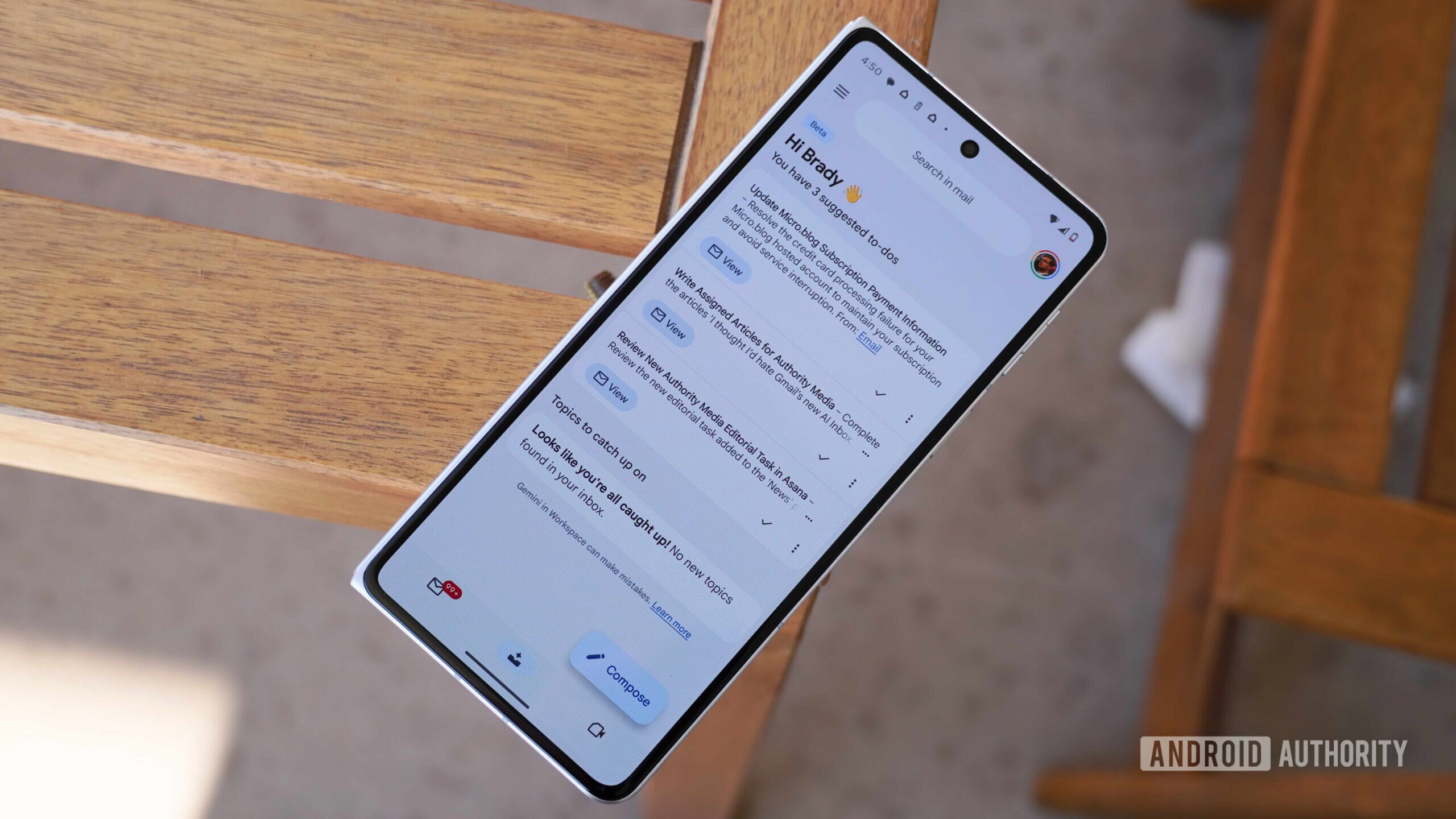
AI Inbox surfaces content from your emails and divides it into two categories: to-dos and topics. The former category is all about action items. If an email needs further attention, whether it’s a simple reply or a task, it will appear in the “suggested to-dos” section of the AI Inbox. For each action item, you’ll see a short bolded summary and a longer AI-generated description of the task at hand.
It turns your inbox into a custom to-do list, and you can view the full email the task is based on by tapping the “View” button. If there are multiple email threads used as sources for the task, you’ll see all of them in the AI Inbox. Google says certain tasks that require sending a follow-up email or editing a document could show an AI-generated contextual draft or offer a Workspace link, but I haven’t seen this in action on either of my Google accounts with AI Inbox.
Once this becomes widely available, AI Inbox could transition from being a simple email to-do list to becoming a real productivity tool, but it’s not there yet. For now, you can tap the checkmark next to each task to complete it, or press the three-dot menu to give feedback.

The other section of AI Inbox lists topics you may need to keep track of, and this is the area I find most exciting. It’s less about managing action items and more about highlighting the small bits of information that get washed away in a flood of incoming messages.
For instance, AI Inbox surfaced a warning about unauthorized parking from my apartment complex that I might’ve missed. The email it sourced the information from had the subject line, “A new post has been added to the wall.” With a subject and description this vague, it’s entirely reasonable I would’ve ignored it — I get tens of emails just like this one from the online community forum monthly. AI Inbox was able to look deeper into the email body and spot its importance before highlighting it as a topic.
I’ve also seen AI Inbox surface bills that are almost due, or receipts for recent purchases. In one case, AI Inbox confirmed that my Best Buy order was picked up. These are all simple reminders, but given that AI Inbox takes only a few seconds to skim a few times each day, I appreciate them.
Consistency isn’t a strength of AI Inbox

I’ve used AI Inbox for a few weeks, and it’s clear that you can’t count on the feature to remind you of important dates or tasks. Think of it like a safety net in case an email slips through your inbox, or you simply forget something. AI Inbox has reminded me about action items I would’ve forgotten about, but there are times when the to-do and topic lists look barren. Sometimes, my partner and I get the same emails, but AI Inbox only highlights them for one of us.
As long as you don’t put too much faith in it, AI Inbox can nudge you about upcoming events and responsibilities. I appreciate how my AI Inbox completely ignores promotions, social updates, and spam, but it probably filters out too much out the moment.
I’d like to see more customization, so I can tell AI Inbox which emails I always want surfaced — and which I never want to see. With a few upgrades, AI Inbox could become Google’s best AI feature in Workspace yet.
Thank you for being part of our community. Read our Comment Policy before posting.
Source link